HotBox

HotBox
License:
Free
Language:
English
Developer:
Developer's website
OS:
Mac OS X
Added:
See detailed info

Softonic review

Cyril Roger

“Make anything full screen”

by Cyril Roger about HotBox

HotBox is a smart little preference pane item that lets you zoom in anywhere on your screen.

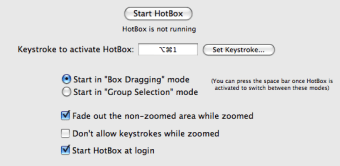
Few Mac users know this, but using a simple keyboard shortcut, you can zoom in and out of your screen. What HotBox does is allow you to select a specific area and zoom into it, making it full screen. The item is really easy to work with once you know the keyboard shortcuts (which you can set yourself) to launch, zoom in and zoom out. You can also choose to fade out all other elements and focus on the one you zoomed into.

Despite being very easy to use, the application was a little difficult to configure. The disk image took time to mount and once the item was installed, we still had to go into mouse and keyboard preferences and set the proper keyboard shortcuts for zoom in and zoom out to get HotBox to work.

On the whole though, HotBox is a great preference pane item to have if you need to zoom in onto an area of your screen, like if you are working on design on photography.

Despite a confusing setup process, HotBox is a nifty little tool to zoom in on any part of your screen.


Pros
  • Run with any keystroke
  • Goo use of zoom
Cons
  • Trouble mounting dmg
Free Download HotBox 1.0

HotBox is virus free

We have analyzed the latest version of HotBox with 30 antivirus engines and it is virus free. See analysis results.

TESTED VIRUS FREE - Softonic GUARANTEED

Developer's description

HotBox is a background application that allows you to make anything on screen full screen! Just press a keystroke and drag a box around whatever you want, and it'll fill your entire monitor.

It works great for things like webpages with videos or flash movies that don't have a full screen button, games you want to play full screen, text or images you want to enlarge, or anything else you might ever want to see become big. Anything that's on the screen can be made full screen, so the possibilities are potentially endless!

Review and rate HotBox

Your avatar

Your opinion is important.
Help other users - be the first to review this program.

Review
  1. Maximum: 75 characters

  2. See example

Pros and Cons
Rate
  1. What rating would you give HotBox?

    You need to fill in all fields

    • Usability:

      Not rated
    • Stability:

      Not rated
    • Installation:

      Not rated
    • Functionality:

      Not rated
    • Appearance:

      Not rated
    • Overall rating:

      Not rated
  2. Don't worry, we won't make your email address public.

You're not allowed to share serial numbers, cracks, etc. or link to pages that contain them. If you do, your user account will be deleted, your IP address logged and legal action will be taken.

Get started - just ask a question!

Write a title for your question.

Alternativesto HotBox

  • In English:
    Screenshot Plus Widget
    Screenshot Plus Widget

    Take screen captures quickly and easily

    Softonic rating:
    • 9/10
    User rating:
    • 9/10
  • Better rating:
    HotBox
    HotBox

    Make anything full screen

    Softonic rating:
    • 9/10
    User rating:
    • 10/10
Compare with HotBox

Screenshots from HotBox

Download rank: Screen Capture

12 of 26

Softonic rating:
  • Excellent
  • 9/10
User rating: (1 rating)
  • Essential
  • 10/10
Your rating:
Your rating
  • 0

Review and rate this program

Top Downloads: Screen Capture

  • United States
  • Global

  1. Copernicus

    Manage all of your screenshots

  2. Skitch
  3. SnagIt
  4. GrabMac
  5. CaptureIt!

Reviews of HotBox in other languages